
Congratulations on your purchase of a Windows 11 Pro license key from clgddigital.com! To unlock the full potential of your operating system, follow these quick and simple steps to activate Windows 11 Pro using the genuine key you received via email.
Note: If you have purchased Microsoft Windows 10 Pro Key, then you’re applying the key on the same version. This key won’t work on Windows 10 Home version or upgrade purpose.
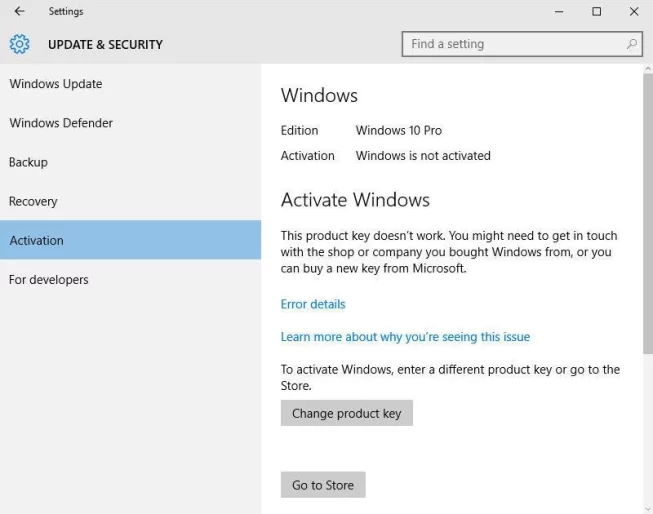
Table of Contents
- Step 1: Purchase and Retrieve Your License Key
- Step 2: Stable Internet Connection
- Step 3: Open Settings on Your Windows 11 Device
- Step 4: Navigate to System
- Step 5: Choose Activation
- Step 6: Enter Your License Key
- Step 7: Follow On-Screen Instructions
- Step 8: Confirmation and Enjoyment
- Conclusion
Step 1: Purchase and Retrieve Your License Key
Upon completing your purchase on clgddigital.com, check your email for the confirmation message. Inside, you’ll find your Windows 11 Pro license key. Keep this email accessible, as you’ll need the key for the activation process.
Step 2: Stable Internet Connection
Ensure your device is connected to a stable internet connection. A reliable connection is essential for the activation process to communicate with Microsoft’s servers.
Step 3: Open Settings on Your Windows 11 Device
Click on the Start menu, then select Settings (the gear-shaped icon). Alternatively, use the keyboard shortcut Windows key + I to open Settings directly.
Step 4: Navigate to System
In the Settings menu, locate and click on the System option. This will take you to a new window with various system-related settings.
Step 5: Choose Activation
On the left-hand menu within the System section, select Activation. Here, you’ll find information about your current Windows activation status.

Step 6: Enter Your License Key
Locate the option to enter a product key. Click on it and input the Windows 11 Pro license key from clgddigital.com. Double-check for accuracy to avoid errors.
Step 7: Follow On-Screen Instructions
After entering the key, follow the on-screen instructions to complete the activation process. Windows will connect to Microsoft’s servers to validate your key. If successful, your Windows 11 Pro will be activated.
Step 8: Confirmation and Enjoyment
Look for the confirmation message indicating that your Windows 11 Pro is now activated. Congratulations! Explore the enhanced features and functionalities of Windows 11 Pro with confidence.
Conclusion
In case you encounter any issues during activation, remember that clgddigital.com offers 24×7 customer support for assistance. Now that your Windows 11 Pro is activated, make the most of the advanced capabilities offered by the operating system. Happy computing!.


188bet250 is a decent platform with tons of games. Worth trying if you enjoy gambling responsibly! It is a large selection, and a good platform to start. 188bet250
Anyone tried hiii88z? Thinking about putting some money down, but want to hear some reviews first. Is hiii88z good?
I’m giving 365gold a shot, hoping for some good returns. Gotta chase that gold, right Give it a try using 365gold
I stumbled upon strv123b the other day and I was pleasantly surprised. The site is clean, the loading times are fast, and everything felt smooth. Give it a try y’all! strv123b
Been playing on linkow88 for a bit now, and it’s not bad. The interface is clean, and I haven’t had any issues with payouts. Worth a look if you’re hunting for something new. linkow88
Your point of view caught my eye and was very interesting. Thanks. I have a question for you.
ibethph is the place to be! Give it a visit if you are looking for some online excitement. Lots happening over there. Start playing at ibethph
Looking for the in7gamedownload? I found it! Here’s the link to make your life a little easier. Get it while it’s hot at in7gamedownload
eushbet is on my radar. It is one of my new favorite spots for online betting! Give them a look sometime!. Check it here eushbet